通知センター(ベル+ドロップダウンパネル)
この画面パターンについて
ヘッダーのベルアイコンをクリックすると通知一覧がドロップダウンで開く、SaaS・社内ツール定番の通知センターUIです。 未読バッジ・すべて/未読タブ・個別既読・一括既読まで、通知UIに求められる一連の動きを実装します。 未読状態をデータで一元管理してバッジ・リスト・タブを連動させる設計と、外側クリックで閉じる開閉制御が実装の核心です。
こんな場面で使えます
- SaaS・社内ツールのヘッダー — 通知をどの画面からでも確認できるようにする
- 承認・ワークフロー系アプリ — 承認依頼の到着をバッジで気づかせる
- コメント・メンション通知 — 自分宛ての更新をまとめて確認する
この画面で使っているUIコンポーネント
| # | パーツ | この画面での役割 |
|---|---|---|
| 1 | 通知ベルボタン+未読バッジ | 未読件数の表示と開閉の起点 |
| 2 | ドロップダウンパネル | ベルの下に開く通知一覧 |
| 3 | タブ切り替え | 「すべて」「未読 (n)」の表示切替 |
| 4 | 通知アイテム | 種別アイコン・抜粋・相対時刻・未読ドット |
| 5 | 個別既読 | クリックで既読化・バッジと連動 |
| 6 | 「すべて既読にする」 | 一括既読の操作 |
| 7 | 空状態表示 | 未読0件時のメッセージ |
| 8 | 外側クリック・ESC制御 | パネルを閉じるUX定石 |
実装のポイント・注意点
開閉制御の定番の罠は「開くクリックが document の外側クリック判定にも拾われて、開いた瞬間に閉じる」ことです。
document のクリックで e.target.closest('.notif-anchor') を調べ、ベルとパネルの内側なら閉じない判定にすると、stopPropagation に頼らないきれいな実装になります。
未読数はバッジ・タブ名・空状態の3か所に影響するため、独立した変数を持たず常に通知配列の unread フラグから算出し、既読操作後は render() で全体を再描画します。
相対時刻は固定文字列ではなく minutesAgo から算出する設計にして、いつデモを開いても「5分前」が自然に表示されるようにします。
なお本事例は従来の absolute 配置+クリック判定で実装しています。Popover API は外側クリックを自動処理できますが、ヘッダー直下への配置にはブラウザ対応が揃わない anchor positioning が必要なため、この技術選定を採用しました。
8個のUIコンポーネントをHTML・CSS・バニラJavaScriptのみで組み合わせており、 フレームワーク不要で画面ごとコピペして使えます。
動作サンプル
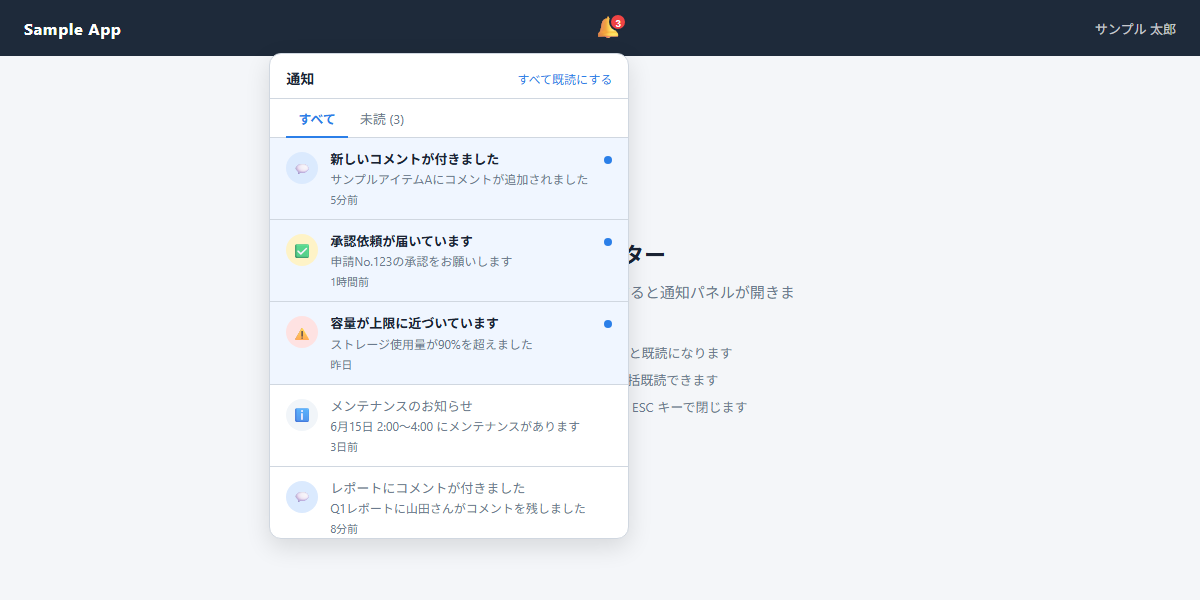 動作サンプルを別ウィンドウで確認 ↗
試してみる:
- ベルをクリックしてパネルを開き、パネルの外をクリックすると閉じることを確認
- 未読の通知をクリックして、バッジとタブの「未読 (n)」が連動して減ることを確認
- 「すべて既読にする」で未読タブが空状態になることを確認
そのほかの操作も自由に試してみてください。
サンプルソース
3つのファイルを同じフォルダに保存し、ブラウザで index.html を開くと動作確認できます。
ファイル名:index.html / style.css / script.js
保存時の文字コードは UTF-8 を指定してください。
<!DOCTYPE html>
<html lang="ja">
<head>
  <meta charset="UTF-8">
  <meta name="viewport" content="width=device-width, initial-scale=1">
  <title>通知センター サンプル</title>
  <link rel="stylesheet" href="./style.css">
</head>
<body>

<!-- ===== 画面全体ラッパー ===== -->
<div class="notif-screen">

  <!-- ===== ヘッダー ===== -->
  <header class="app-header">
    <span class="app-logo">Sample App</span>

    <!-- 右側グループ:ベル+ユーザー名 -->
    <div class="header-right">
    <div class="notif-anchor">
      <button type="button" class="bell-btn" id="bellBtn"
              aria-haspopup="true" aria-expanded="false" aria-label="通知">
        🔔<span class="bell-badge" id="bellBadge" hidden></span>
      </button>

      <!-- 通知パネル(ベルの直下に絶対配置) -->
      <div class="notif-panel" id="notifPanel" hidden>
        <div class="panel-header">
          <h2 class="panel-title">通知</h2>
          <button type="button" class="link-btn" id="readAllBtn">すべて既読にする</button>
        </div>
        <div class="panel-tabs">
          <button type="button" class="panel-tab is-active" data-tab="all">すべて</button>
          <button type="button" class="panel-tab" data-tab="unread" id="unreadTab">未読</button>
        </div>
        <ul class="notif-list" id="notifList"></ul>
        <div class="panel-empty" id="panelEmpty" hidden>
          <p class="empty-icon">🔕</p>
          <p class="empty-message">未読の通知はありません</p>
        </div>
      </div>
    </div>

    <span class="user-name">サンプル 太郎</span>
    </div><!-- /.header-right -->
  </header>

  <!-- ===== 本文 ===== -->
  <main class="demo-body">
    <div class="demo-guide">
      <h1 class="demo-guide-title">通知センター</h1>
      <p class="demo-guide-text">右上のベルアイコンをクリックすると通知パネルが開きます。</p>
    </div>
  </main>

</div><!-- /.notif-screen -->

<script src="./script.js"></script>
</body>
</html>/* ===== リセット・ベース ===== */
*, *::before, *::after { box-sizing: border-box; margin: 0; padding: 0; }
:root {
--color-bg: #F4F6F9;
--color-header-bg: #1E2A3A;
--color-header-text: #fff;
--color-panel-bg: #fff;
--color-border: #D0D7E0;
--color-text: #1A2333;
--color-text-muted: #6B7A8E;
--color-unread-bg: #F0F6FF;
--color-unread-dot: #2B7FE8;
--color-badge-bg: #EF4444;
--color-badge-text: #fff;
--color-tab-active: #2B7FE8;
--panel-width: 360px;
--panel-shadow: 0 8px 24px rgba(0, 0, 0, 0.12);
}
body {
font-family: -apple-system, BlinkMacSystemFont, 'Segoe UI', sans-serif;
font-size: 14px;
background: var(--color-bg);
color: var(--color-text);
min-height: 100vh;
}
/* ===== 画面ラッパー ===== */
.notif-screen {
display: flex;
flex-direction: column;
min-height: 100vh;
}
/* ===== ヘッダー ===== */
.app-header {
display: flex;
align-items: center;
justify-content: space-between;
padding: 0 24px;
height: 56px;
background: var(--color-header-bg);
color: var(--color-header-text);
position: relative;
z-index: 10;
}
.app-logo {
font-size: 16px;
font-weight: 700;
letter-spacing: 0.04em;
}
.user-name {
font-size: 13px;
color: rgba(255, 255, 255, 0.75);
}
/* ===== ヘッダー右グループ(ベル+ユーザー名) ===== */
.header-right {
display: flex;
align-items: center;
gap: 16px;
}
/* ===== 通知ベルとパネルの起点 ===== */
.notif-anchor { position: relative; }
/* ===== ベルボタン ===== */
.bell-btn {
position: relative;
background: transparent;
border: none;
cursor: pointer;
font-size: 22px;
line-height: 1;
padding: 6px;
border-radius: 8px;
transition: background 0.15s;
color: var(--color-header-text);
}
.bell-btn:hover { background: rgba(255, 255, 255, 0.12); }
/* ===== 未読バッジ ===== */
.bell-badge {
position: absolute;
top: 2px;
right: 2px;
min-width: 18px;
height: 18px;
padding: 0 4px;
background: var(--color-badge-bg);
color: var(--color-badge-text);
font-size: 10px;
font-weight: 700;
line-height: 18px;
text-align: center;
border-radius: 9px;
border: 2px solid var(--color-header-bg);
}
.bell-badge[hidden] { display: none; }
/* ===== 通知パネル ===== */
.notif-panel {
position: absolute;
top: calc(100% + 8px);
right: 0;
width: var(--panel-width);
background: var(--color-panel-bg);
border: 1px solid var(--color-border);
border-radius: 12px;
box-shadow: var(--panel-shadow);
z-index: 100;
}
.notif-panel[hidden] { display: none; }
/* ===== パネルヘッダー ===== */
.panel-header {
display: flex;
align-items: center;
justify-content: space-between;
padding: 14px 16px 10px;
border-bottom: 1px solid var(--color-border);
}
.panel-title {
font-size: 14px;
font-weight: 700;
color: var(--color-text);
}
.link-btn {
background: transparent;
border: none;
cursor: pointer;
font-size: 12px;
color: var(--color-tab-active);
padding: 0;
font-family: inherit;
transition: opacity 0.15s;
}
.link-btn:hover { opacity: 0.75; }
/* ===== タブ ===== */
.panel-tabs {
display: flex;
padding: 0 16px;
border-bottom: 1px solid var(--color-border);
}
.panel-tab {
background: transparent;
border: none;
border-bottom: 2px solid transparent;
cursor: pointer;
font-size: 13px;
font-family: inherit;
color: var(--color-text-muted);
padding: 10px 12px 8px;
margin-bottom: -1px;
transition: color 0.15s, border-color 0.15s;
}
.panel-tab.is-active {
color: var(--color-tab-active);
border-bottom-color: var(--color-tab-active);
font-weight: 600;
}
/* ===== 通知リスト ===== */
.notif-list {
list-style: none;
max-height: 400px;
overflow-y: auto;
}
/* ===== 通知アイテム ===== */
.notif-item {
display: flex;
align-items: flex-start;
gap: 12px;
padding: 12px 16px;
cursor: pointer;
border-bottom: 1px solid var(--color-border);
transition: background 0.1s;
position: relative;
}
.notif-item:last-child { border-bottom: none; }
.notif-item:hover { background: #F8FAFC; }
.notif-item.is-unread { background: var(--color-unread-bg); }
.notif-item.is-unread:hover { background: #E8F0FE; }
/* ===== 種別アイコン ===== */
.notif-icon {
flex-shrink: 0;
width: 32px;
height: 32px;
border-radius: 50%;
display: flex;
align-items: center;
justify-content: center;
font-size: 14px;
margin-top: 2px;
}
.icon-comment { background: #DBEAFE; }
.icon-approval { background: #FEF3C7; }
.icon-alert { background: #FEE2E2; }
.icon-info { background: #F1F5F9; }
/* ===== 通知テキスト ===== */
.notif-content { flex: 1; min-width: 0; }
.notif-title {
font-size: 13px;
font-weight: 600;
color: var(--color-text);
line-height: 1.4;
margin-bottom: 2px;
}
.notif-item:not(.is-unread) .notif-title {
font-weight: 400;
color: var(--color-text-muted);
}
.notif-body {
font-size: 12px;
color: var(--color-text-muted);
overflow: hidden;
text-overflow: ellipsis;
white-space: nowrap;
margin-bottom: 4px;
}
.notif-time {
font-size: 11px;
color: var(--color-text-muted);
}
/* ===== 未読ドット ===== */
.unread-dot {
flex-shrink: 0;
width: 8px;
height: 8px;
border-radius: 50%;
background: var(--color-unread-dot);
margin-top: 6px;
}
/* ===== 空状態 ===== */
.panel-empty {
padding: 32px 16px;
text-align: center;
}
.panel-empty[hidden] { display: none; }
.empty-icon { font-size: 32px; margin-bottom: 8px; }
.empty-message { font-size: 13px; color: var(--color-text-muted); }
/* ===== 本文エリア ===== */
.demo-body {
flex: 1;
display: flex;
align-items: center;
justify-content: center;
padding: 48px 24px;
}
.demo-guide { text-align: center; }
.demo-guide-title {
font-size: 22px;
font-weight: 700;
color: var(--color-text);
margin-bottom: 12px;
}
.demo-guide-text {
font-size: 15px;
color: var(--color-text-muted);
}
/* ===== スマホ幅対応 ===== */
@media (max-width: 480px) {
.notif-panel {
position: fixed;
top: 56px;
left: 8px;
right: 8px;
width: auto;
}
.app-header { padding: 0 16px; }
}/* =====================================================
通知センターのスクリプト
仕組み:notifications 配列が唯一の情報源。
すべての操作(既読化・一括既読・タブ切替)は
配列の unread フラグを書き換えて render() を呼ぶだけ。
render() がバッジ・リスト・タブ表記・空状態を
毎回まとめて再計算して反映する。
外側クリックは closest('.notif-anchor') で内外を判定。
===================================================== */
// ===== 設定値 =====
var BELL_BTN = document.getElementById('bellBtn');
var BELL_BADGE = document.getElementById('bellBadge');
var NOTIF_PANEL = document.getElementById('notifPanel');
var NOTIF_LIST = document.getElementById('notifList');
var PANEL_EMPTY = document.getElementById('panelEmpty');
var UNREAD_TAB = document.getElementById('unreadTab');
var READ_ALL_BTN = document.getElementById('readAllBtn');
// ===== 通知データ =====
// minutesAgo は「デモを開いた時点からの経過分数」として扱う(絶対時刻でなく相対値)
// 実案件ではAPIが返すISO日時から同じヘルパーで相対時刻に変換する
var notifications = [
{ id: 1, type: 'comment', title: '新しいコメントが付きました', body: 'サンプルアイテムAにコメントが追加されました', minutesAgo: 5, unread: true },
{ id: 2, type: 'approval', title: '承認依頼が届いています', body: '申請No.123の承認をお願いします', minutesAgo: 60, unread: true },
{ id: 3, type: 'alert', title: '容量が上限に近づいています', body: 'ストレージ使用量が90%を超えました', minutesAgo: 1440, unread: true },
{ id: 4, type: 'info', title: 'メンテナンスのお知らせ', body: '6月15日 2:00〜4:00 にメンテナンスがあります', minutesAgo: 4320, unread: false },
{ id: 5, type: 'comment', title: 'レポートにコメントが付きました', body: 'Q1レポートに山田さんがコメントを残しました', minutesAgo: 8, unread: false },
{ id: 6, type: 'approval', title: '申請が承認されました', body: '申請No.118が承認されました', minutesAgo: 180, unread: false },
{ id: 7, type: 'alert', title: 'ログイン失敗が検知されました', body: '不明なIPアドレスからのログイン試行があります', minutesAgo: 2880, unread: false },
{ id: 8, type: 'info', title: '新機能のご案内', body: 'ダッシュボードに新しいウィジェットが追加されました', minutesAgo: 10080, unread: false }
];
// 現在表示中のタブ('all' or 'unread')
var currentTab = 'all';
// パネルの開閉フラグ
var isPanelOpen = false;
// ===== 相対時刻ヘルパー =====
function formatRelativeTime(minutesAgo) {
if (minutesAgo < 1) return 'たった今';
if (minutesAgo < 60) return minutesAgo + '分前';
if (minutesAgo < 1440) return Math.floor(minutesAgo / 60) + '時間前';
if (minutesAgo < 2880) return '昨日';
return Math.floor(minutesAgo / 1440) + '日前';
}
// ===== 種別設定 =====
var TYPE_CONFIG = {
comment: { icon: '💬', cls: 'icon-comment' },
approval: { icon: '✅', cls: 'icon-approval' },
alert: { icon: '⚠️', cls: 'icon-alert' },
info: { icon: 'ℹ️', cls: 'icon-info' }
};
// ===== 描画 =====
// 通知配列をもとにバッジ・タブ名・リスト・空状態をすべて再計算する
function render() {
var unreadCount = notifications.filter(function(n) { return n.unread; }).length;
// バッジ更新
if (unreadCount > 0) {
BELL_BADGE.textContent = unreadCount;
BELL_BADGE.hidden = false;
} else {
BELL_BADGE.hidden = true;
}
// タブ名更新
UNREAD_TAB.textContent = unreadCount > 0 ? '未読 (' + unreadCount + ')' : '未読';
// 表示対象を絞り込む
var items = currentTab === 'unread'
? notifications.filter(function(n) { return n.unread; })
: notifications;
// リストを再生成
NOTIF_LIST.innerHTML = '';
if (items.length === 0) {
PANEL_EMPTY.hidden = false;
return;
}
PANEL_EMPTY.hidden = true;
items.forEach(function(notif) {
var config = TYPE_CONFIG[notif.type] || TYPE_CONFIG.info;
var li = document.createElement('li');
li.className = 'notif-item' + (notif.unread ? ' is-unread' : '');
li.dataset.id = notif.id;
// 種別アイコン
var icon = document.createElement('div');
icon.className = 'notif-icon ' + config.cls;
icon.textContent = config.icon;
// テキストエリア
var content = document.createElement('div');
content.className = 'notif-content';
var title = document.createElement('p');
title.className = 'notif-title';
title.textContent = notif.title;
var body = document.createElement('p');
body.className = 'notif-body';
body.textContent = notif.body;
var time = document.createElement('p');
time.className = 'notif-time';
time.textContent = formatRelativeTime(notif.minutesAgo);
content.appendChild(title);
content.appendChild(body);
content.appendChild(time);
li.appendChild(icon);
li.appendChild(content);
// 未読ドット(未読のみ)
if (notif.unread) {
var dot = document.createElement('span');
dot.className = 'unread-dot';
li.appendChild(dot);
}
NOTIF_LIST.appendChild(li);
});
}
// ===== パネルの開閉 =====
function openPanel() {
isPanelOpen = true;
NOTIF_PANEL.hidden = false;
BELL_BTN.setAttribute('aria-expanded', 'true');
render();
}
function closePanel() {
isPanelOpen = false;
NOTIF_PANEL.hidden = true;
BELL_BTN.setAttribute('aria-expanded', 'false');
}
// ベルクリック → トグル開閉
BELL_BTN.addEventListener('click', function() {
if (isPanelOpen) { closePanel(); } else { openPanel(); }
});
// ===== タブ切り替え =====
document.querySelectorAll('.panel-tab').forEach(function(tab) {
tab.addEventListener('click', function() {
currentTab = tab.dataset.tab;
document.querySelectorAll('.panel-tab').forEach(function(t) {
t.classList.toggle('is-active', t.dataset.tab === currentTab);
});
render();
});
});
// ===== 個別既読 =====
// リスト全体に委譲。クリックした li.notif-item の data-id から通知を特定して既読化
NOTIF_LIST.addEventListener('click', function(e) {
var item = e.target.closest('.notif-item');
if (!item) return;
var id = Number(item.dataset.id);
var notif = notifications.find(function(n) { return n.id === id; });
if (notif && notif.unread) {
notif.unread = false;
render();
}
});
// ===== 一括既読 =====
READ_ALL_BTN.addEventListener('click', function() {
notifications.forEach(function(n) { n.unread = false; });
render();
});
// ===== 外側クリックで閉じる =====
// composedPath() でイベント発生時のDOMパスを参照する。
// innerHTML='' でターゲットがDOMから削除された後も元のパスが残るため、
// 既読化→再描画後でも「内側か外側か」を正しく判定できる。
document.addEventListener('click', function(e) {
if (!isPanelOpen) return;
var path = e.composedPath ? e.composedPath() : [];
var anchor = document.querySelector('.notif-anchor');
if (path.indexOf(anchor) !== -1) return;
closePanel();
});
// ===== ESCキーで閉じる =====
document.addEventListener('keydown', function(e) {
if (e.key === 'Escape' && isPanelOpen) {
closePanel();
BELL_BTN.focus();
}
});
// ===== 初期描画 =====
render();AI用プロンプト
以下のプロンプトをコピーしてAIに渡すと、同様のコンポーネントを生成できます。
ChatGPTやClaudeにこのプロンプトを渡すと、同様のコンポーネントをゼロから生成・カスタマイズできます。ライブラリ指定や通知種別変更など、要件を追記して使うのがおすすめです。
※ このプロンプトを使ってもデモとまったく同じ動作にならない場合があります。AIの解釈や生成タイミングによって差が出ることをご了承ください。
💡 jQuery・Vue・React など特定のライブラリで実装したい場合は、プロンプトの末尾に「〇〇を使って実装してください」と追記してください。
# 通知センター 作成依頼

## 概要
ヘッダーのベルアイコンをクリックすると通知一覧のドロップダウンパネルが開く
通知センターUIを作成してください。未読バッジと既読管理を連動させます。

## 要件
- ヘッダー右側にベルアイコンを置き、右上に未読件数の赤バッジを表示する(未読0件で非表示)
- ベルクリックでパネルを開閉する。パネルはベルの直下・右寄せに表示する
- パネルの外側をクリック、またはESCキーで閉じる(パネル内のクリックでは閉じない)
- パネル内に「すべて」「未読 (n)」の2タブを設け、未読タブは未読のみ表示する
- 通知アイテムは 種別アイコン(コメント=青/承認依頼=黄/アラート=赤/お知らせ=グレー)・
  タイトル・本文の1行抜粋・相対時刻(「5分前」「昨日」等)・未読ドット で構成する。
  初期データは8件(未読3件)
- 未読の通知をクリックすると既読になり、バッジ・タブの件数・未読ドットが連動して更新される
- パネルヘッダーの「すべて既読にする」で全件を既読にする
- 未読タブで未読が0件のときは「未読の通知はありません」の空状態を表示する
- 通知一覧は最大高さを決めて内部スクロールにする

## 技術仕様
- HTML / CSS / バニラJavaScript で実装
- 外部ライブラリ:なし
- 通知データはJavaScript内の配列で保持し、相対時刻は表示時に算出する
- レスポンシブ対応:必要(スマホ幅ではパネルを画面幅いっぱいに表示)

## 動作詳細
- 未読件数は通知データから都度算出し、バッジ・タブ表記・リストを1つの描画関数で更新する
- 外側クリック判定は closest() でベルとパネルを含む要素の内外を判定する
- ベルボタンに aria-haspopup / aria-expanded を設定し、開閉状態と同期させる
- 通知アイテムの生成は createElement と textContent を使い、innerHTML に変数を結合しない

## 出力形式
HTML・CSS・JavaScriptを分けて出力してください。
各ファイルは単独でコピー&ペーストして使えるよう記述してください。